1. 01Step 1 of 5

    Choose your canvas & drop your media

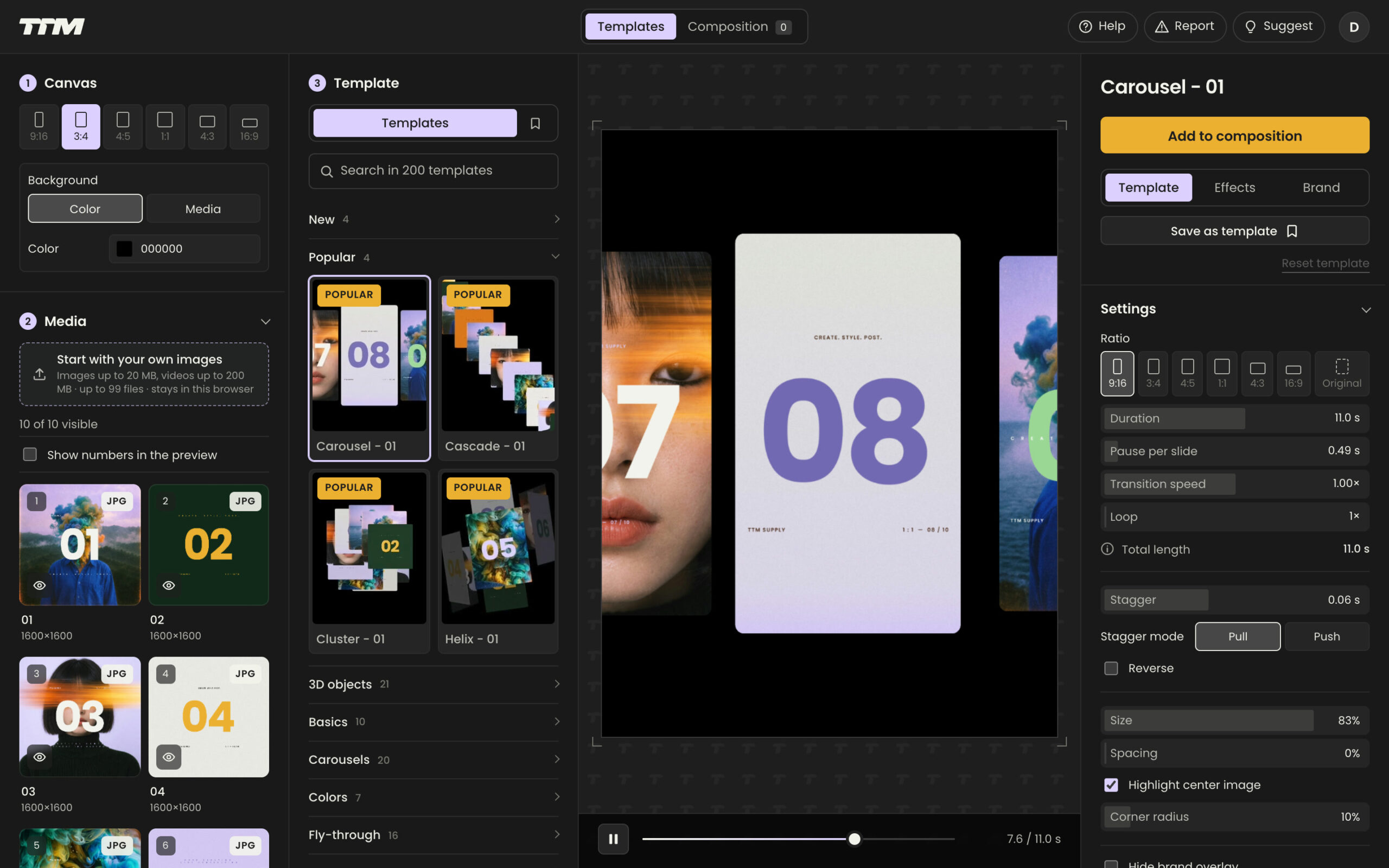
    Pick the format you post in, from Reel to Landscape, with a color or your own media behind it. Then drag in your images and videos: reorder them, switch them on or off and trim a video. Nothing is uploaded.
    Choose your canvas & drop your media
    01Canvas & media
  2. 02Step 2 of 5

    Pick a template

    Browse the library by category or search by name: stacks, carousels, typography, mockups and more. Every tile plays, so you see the motion before you pick it.
    Pick a template
    02Templates
  3. 03Step 3 of 5

    Make it yours

    Tune the speed, the duration, the stagger and the easing. Add your logo, text and font under Brand, and save it all as your own template. Every change shows right away.
    Make it yours
    03Settings
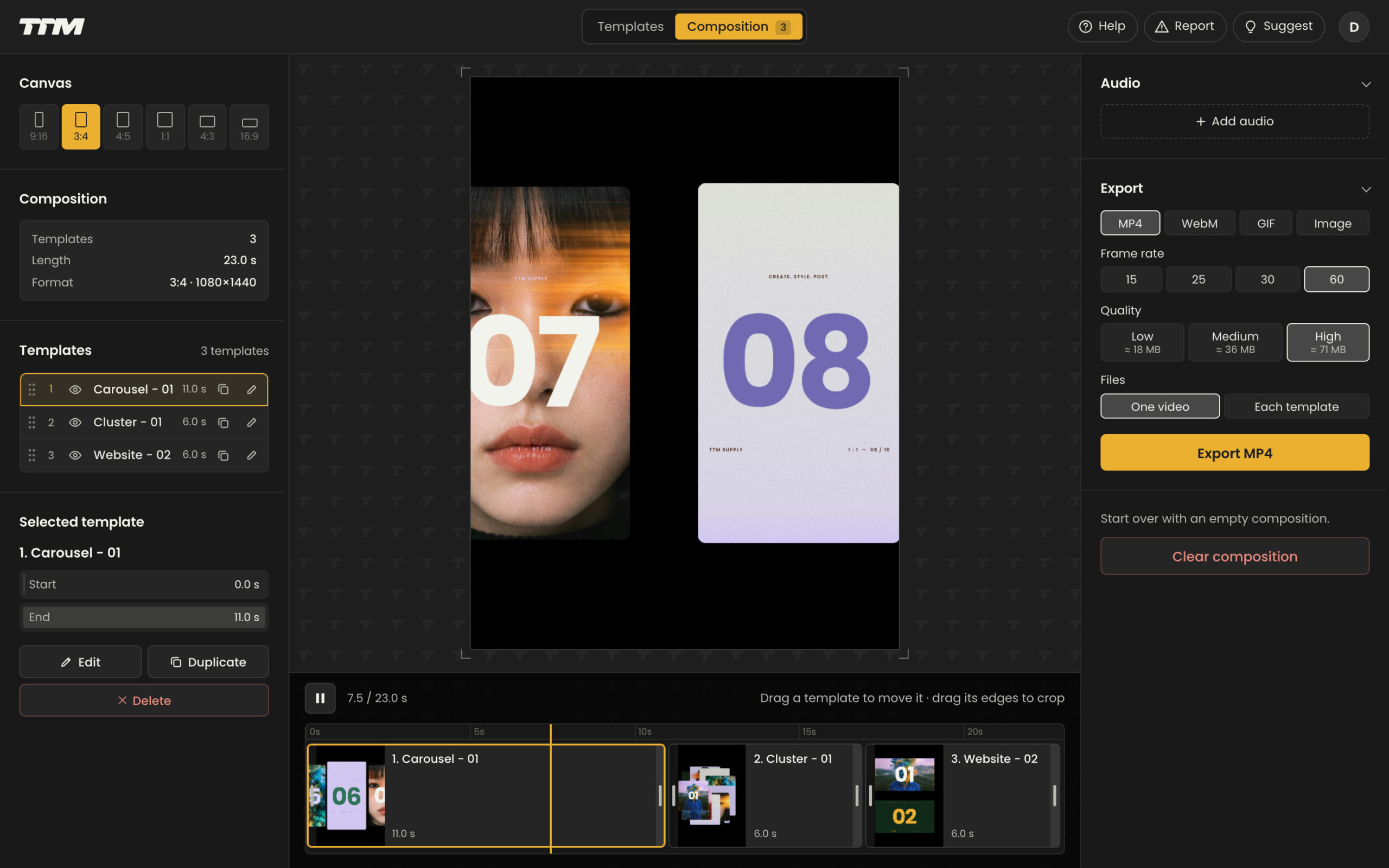
  4. 04Step 4 of 5

    Build a composition

    Line up templates on a timeline. Drag them into order, pull an edge to crop, add your own music and play it back exactly as it will export.
    Build a composition
    04Composition
  5. 05Step 5 of 5

    Export and post

    Export an MP4, a WebM or a GIF at up to 60 frames per second, as one video or one per template, or take a snapshot as a JPG or PNG. Reel, Tall, Portrait, Post, Classic or Landscape: it fits every feed.
    Export and post
    05Export
Under the hood

Small tools. Big difference.

Canvas size
9:163:44:51:14:316:9
01

One design, every format

Reel 9:16, Tall 3:4, Feed 4:5, Post 1:1, Classic 4:3 or Landscape 16:9. Switch, and the template adapts.
Motion that feels right

Pick an easing or shape your own curve: slow, snappy or anything in between.
6.4 / 10.0 sDrag to move · edges to crop
0s2s4s6s8s10s
011. Carousel - 015.0 s
062. Cluster - 015.0 s
Templates2 templates
101Carousel - 015.0 s
206Cluster - 015.0 s

One timeline for the whole piece

Chain templates into one composition. Drag to reorder, pull the edges to crop, and every template keeps its own media and cut.
010203
In · SlideOut · Mask

In and out, the way you want

Let the cards come in and go out one after the other: choose how, and how long between them.
Trim videoclip-04.mp4
0102030401020304
5.6 s

Trim your videos

Two handles, the exact seconds you want. It loops while you trim.
AudioSunday drive · 0:52
Best starts0:21Best0:34Drop0:08Peak
Volume 80%Fade 1.5 sLoop

Music that fits

Pick a track from TTM’s library or upload your own. Drag to the part you want, set the volume and a fade.
ttm.supply/studio
01011600×1600 · JPG
02021600×1600 · JPG
0303MP4 · 0:08
Our servers0 files stored

Your content stays with you

We don’t store any of your images or videos. Everything is read and rendered right here in your browser. Nothing is uploaded.
0105ExampleNorthwindCarousel - 01 · 4:5
  • SettingsAlways
  • FormatAlways
  • Media4 filesYour own
  • Brand2 logos
Open example

Start from an example

Open any of our examples in the studio, with its media or with your own. Its settings and format come along; you choose the rest.
0102

Colors from your media

A color picker with a pipette: take a color straight from your image.
MP4 · 60 fpsWebM · 60 fpsGIF · 720 pxJPG / PNG · still
Saved to your downloads

Export your way

MP4 or WebM in three qualities at 15 to 60 fps, or a GIF up to 720 px wide.
01Launch reelSaved template
06Brand carouselSaved template
02My IndexSaved template

Save your own versions

Tuned a template just right? Save it under its own name and use it again.
01
Effects
Add effect
Fluted glass
Vignette
Grain

Effects over everything

Fluted glass, halftone, grain, scan lines and more over the whole frame. Add the ones you like and set each one.
Brand kitNorthwindAtlas CoffeeTTMNorthwind
05New seasonFresh roastMake it move

Your brand in one click

Add your logos and custom fonts and save them with your text layers as a brand kit. The files stay in your own browser, never uploaded.
Text layersYour own fontsGradientsVideo backgroundsLogo overlayBlend modes
Physics3D cardsStaggerSpeedBounceSlow zoom
Corner radiusWebMGIFSeamless loopsKept after a reloadGuided tour
PerspectiveTiltSwingPause per stepNumber of cardsLine height

And much more

Text layers, 3D cards, physics, your own fonts and plenty more to find in the studio.
Questions

Good to know.

Anything else? Get in touch, we’re happy to help.

No. The studio runs in your browser. For the best experience, use a recent version of Chrome or Edge on a laptop or desktop.

No. Your images and videos are read and rendered on your own device and kept in this browser only. They never reach our servers.

Images: JPG, PNG, WebP, AVIF and GIF up to 20 MB. Videos: MP4, MOV and WebM up to 200 MB. And MP3, WAV, M4A and more for your soundtrack.

An MP4 or WebM video in Low, Medium or High quality at 15, 25, 30 or 60 fps, or a GIF at 360, 540 or 720 px wide. You can export your entire composition as one file or download each template individually.

Yes. Each plan includes every template, including new ones as soon as they’re released.

Yes. You manage and cancel your plan yourself, from your account.